


For Academic Entrepreneurship, we developed an intranet system. The entire platform is designed to streamline and support the exchange of information between lecturers and trainees.
The system administrator or a PA employee enters information about training courses and assigns lecturers and trainees to them. They also have access to the schedules of all training courses, lecturers, and trainees.
In addition to information about their own lectures, lecturers can upload files for trainees.
Trainees have the most limited permissions, mainly allowing them to view information about meetings.
All users can generate PDF files with their own training schedule. The system also includes a messaging module.
The entire platform will be further expanded with new modules.
Goal
The goal of the project is to enable online design of training schedules. This makes it possible to introduce changes to training courses that are immediately visible to logged-in lecturers and trainees. The idea behind the system is to allow trainees to download training schedules as well as lecture materials.
System modules
1. Administrator and PA module
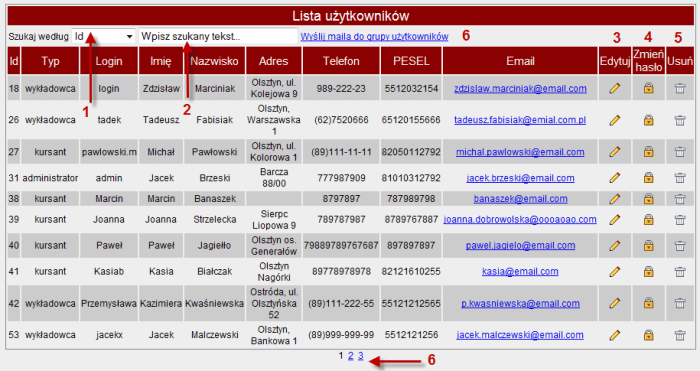
After logging in, the administrator and PA employee have access to information about trainees, lecturers, and training courses. The administrator can add, edit, or delete accounts for administrators, PA employees, lecturers, and trainees. They set passwords for all system users. After each new user is added, or after a password change, the user receives a message with their login details.
The administrator can send information to individual users, as well as to any group of users or to participants of a selected training course.
The administrator has access to edit training courses. They can add, modify, and delete training courses. Each training course consists of lectures. The administrator assigns a lecture to a training course, and then assigns a lecturer to the lecture. Once these steps are completed, a clear training schedule is created. The administrator has access to all training schedules, where they can download a PDF file with the training schedule or a list of training course participants.
2. Lecturer module
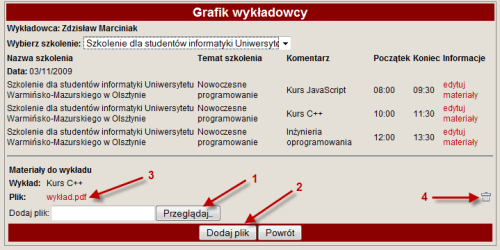
After logging in, the lecturer can edit their own details and upload materials for the lectures they conduct.
In the "Training courses" panel, the lecturer can view the schedules of the training courses they are assigned to. They can download the training schedule, the list of training course participants, and their own personal schedule. The lecturer can send messages to individual training course participants or to all participants of the training course.
3. Trainee module
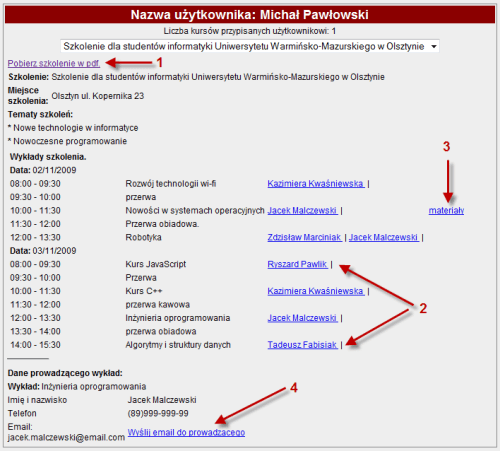
After logging in, the user can edit their own details and access information about the training courses they are assigned to.
In the "Training courses" tab, the trainee has access to training schedules, which they can download in PDF format, access to the lecturers conducting the training lectures, and access to materials uploaded by lecturers for each lecture. The trainee can also send messages to the lecturer.
Please fill in the required fields.
Message sent.